Your Node.js app,online 24/7.
Upload your project and we run it for you. No server, no Docker, no Linux. It restarts itself after a crash, and you watch the logs live from one dashboard. Node.js 22, 24 or 26, JavaScript or TypeScript.
From $3.40/month · cancel any time
Building a bot?Discord botsTelegram bots
Node.js versions
- 22LTS
- 24LTS
- 26Current
{ "name": "price-watcher", "version": "1.0.0", "type": "module", "scripts": { "start": "tsx src/index.ts" }, "dependencies": { "undici": "^7.16.0", "zod": "^4.1.12" }, "devDependencies": { "tsx": "^4.20.6", "typescript": "^5.9.3" }}
- Starting price-watcher process · Node.js 24 · 0.5 vCPU · 512 MB
- Installing dependencies (npm ci)…
- Dependencies installed in 3s
- ▶ npm start (tsx src/index.ts)
- watching 24 product pages, every 5 minutes
- first pass: 24/24 pages in 2.3s, 2 prices changed
Your package.json is the setup
Nothing new to learn. Your package.json already says how your project runs. We run npm ci (or npm install without a lockfile), then npm start, with your own hooks around them. Pick an example or edit it.
- Starting nightly-reports process · Node.js 24 · 0.5 vCPU · 512 MB
- Installing dependencies (npm ci)…
- added 57 packages in 4s
- Dependencies installed in 4s
- ▶ npm start (node index.js)
- > [email protected] start
- > node index.js
- [cron] scheduled "0 3 * * *" (UTC)
- [cron] next run in 6h 12m
- [mail] SMTP pool ready (2 connections)
What runs, in order
while installing
- preinstall
- install
- postinstall
- prepare
when starting
- prestart
- start
node index.js
Online in three steps
- 1
Name it, pick Node.js
Choose version 22, 24 or 26. Start from a TypeScript or JavaScript project we create for you, or from your own.
- 2
Bring your code
Edit in the browser, upload files, or connect a GitHub repository that deploys on every push. Keys and passwords go in Environment, never in your code.
- 3
Press Start
The console shows the install, your hooks and your output, live. If it crashes, it starts again by itself.
Everything a 24/7 process needs
Every pack, every bot. Nothing to switch on.
Your project runs on its own
Each process gets a private, locked-down space with hard CPU and memory limits. A busy neighbour can't slow it down, and nobody else can read your files.
Container
- Runs as
- a non-root user
- Root filesystem
- read-only
- Writable
- /app and a small /tmp
- Linux capabilities
- all dropped
- Network
- your account only
- Memory & CPU
- hard limits
Crashes fix themselves
When the process exits, we start it again, up to five times in a row. The console keeps the error that caused it, so you can see what went wrong.
- Process exited with code 1
- ↻ Restarted automatically (1/5)
- Starting price-watcher process · Node.js 24 · 0.5 vCPU · 512 MB
- ▶ npm start (tsx src/index.ts)
- first pass: 24/24 pages in 2.3s, 2 prices changed
Every deploy is a version
Push to GitHub or save in the editor, and each change is saved as a version. If an update breaks something, restore the last good one in one click.
Deployments
- v14GitHub · main · 3f9c2a1Live
- v13Edited in the browserRestore
- v12GitHub · main · 9b01d4eRestore
Keys stay out of your code
Put tokens and passwords in Environment. They're hidden in the dashboard and handed to your process when it starts.
Environment
DATABASE_URLhiddenSMTP_PASSWORDhiddenAPI_KEYhidden
Native packages just install
Python, make and g++ are already on the image, so better-sqlite3, bcrypt and argon2 build on install without any setup from you.
- Installing dependencies (npm install)…
- > [email protected] install
- > prebuild-install || node-gyp rebuild --release
- added 41 packages in 6s
- Dependencies installed in 6s
A PostgreSQL database per process
Turn it on for any process on a paid pack. Your process's data survives restarts and updates, and DATABASE_URL is in the process's environment before it starts. Nothing to install or connect.
- Tables without a client
- Browse, add and edit rows in the dashboard, or run SQL right there.
- Live statistics
- Connections, size, reads and writes, as they happen.
- Backups you keep
- Download the whole database as one .sql file whenever you like.
- Inside the process
- It shares the process's own RAM and CPU, so there is nothing extra to size or pay for. A process needs 512 MB for one, and we email you before they run short.
PostgreSQL 17 · inventory-sync
DATABASE_URL is in Environment
- Connections
- 3
- Size
- 48 MB
- Queries / min
- 212
Tables
- products
- price_history
- _prisma_migrations
products · 1,284 rows
id | sku | name | stock | price |
|---|---|---|---|---|
1 | KB-104 | Mechanical keyboard | 42 | 89.00 |
2 | MS-220 | Wireless mouse | 118 | 24.50 |
3 | HD-310 | USB-C hub | 0 | 39.90 |
4 | MN-27Q | 27" monitor | 9 | 279.00 |
Building a bot?
Bot builders get a site of their own, with examples for their platform. Same dashboard, same packs, one account.
Any other Node.js process, a worker, a scheduler or a queue consumer, runs right here.
One dashboard for every process
Real screens of the dashboard you get, with a TypeScript worker in it.
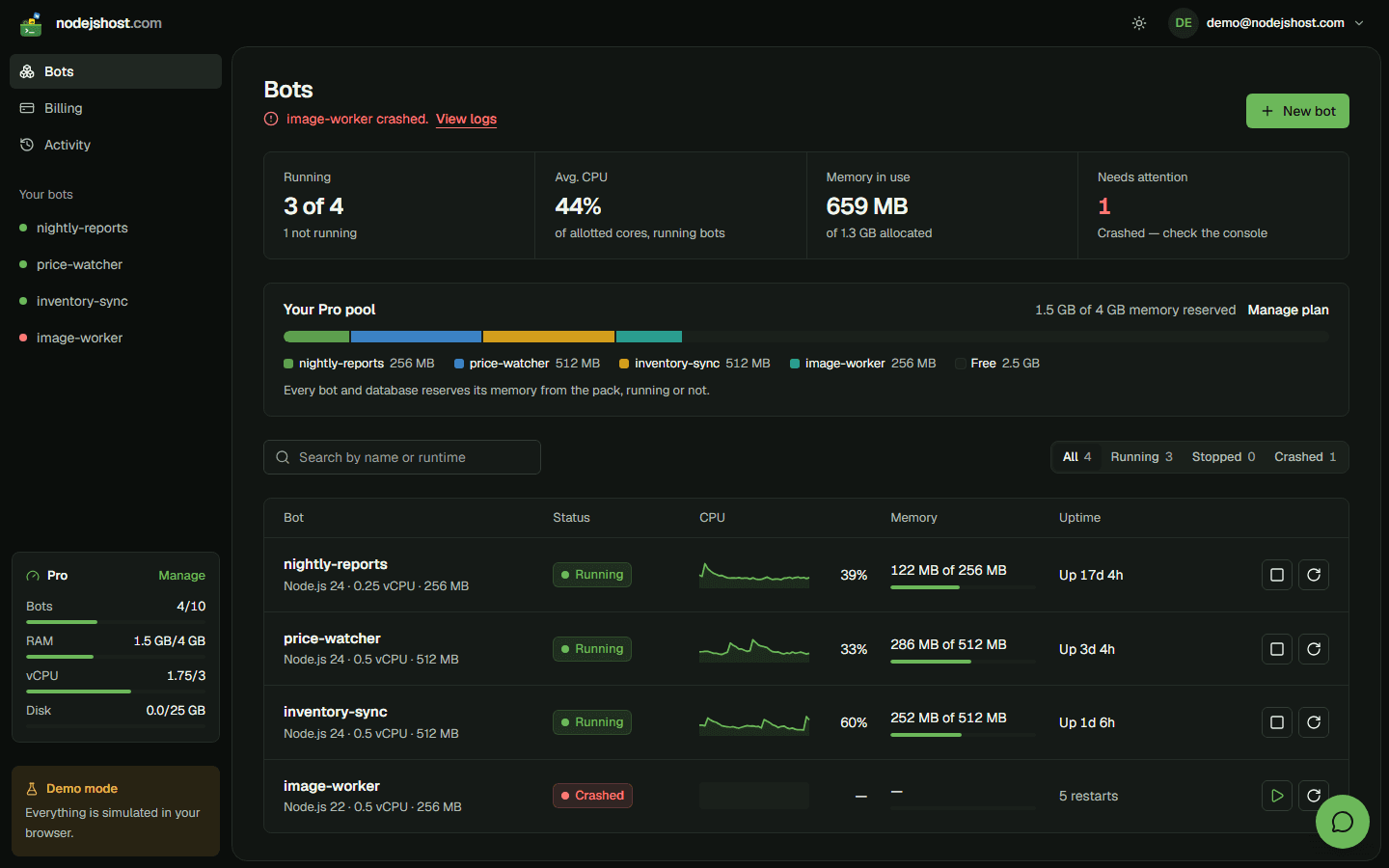
Every process at a glance: status, CPU and memory, with start, stop and restart one click away.
app.nodejshost.com/bots
Pay for a pool, split it your way
Each pack is a pool of processes, memory, CPU and disk. Your processes and their databases share it, and you can change the pack whenever your needs change.
$15/ month
For developers running production bots.
- Bots
- 10
- RAM pool
- 4 GB
- vCPU pool
- 3 vCPU
- Disk
- 25 GB
What you get
- Everything in Starter
- GitHub auto-deploy & versions
- Priority support
- Email support
Prices in USD, billed monthly. Change or cancel your pack any time.
We don't take card payments on the site yet. For a paid pack, message us in the support chat and our team switches it on for you. Free you can start yourself.
Questions, answered
What does my project need?
A package.json with a start script. With a package-lock.json we run npm ci, otherwise npm install, and then npm start. There is nothing else to configure.
In what order do my scripts run?
npm runs your install hooks first: preinstall, install, postinstall and prepare. Then npm start runs prestart and start. Put a build in prestart and code generation in postinstall.
Can I use TypeScript?
Yes. Run it directly with "start": "tsx src/index.ts", or compile first with "prestart": "tsc" and "start": "node dist/index.js". Dev dependencies are installed too, so tsx and typescript are there.
Which Node.js versions can I pick?
Node.js 22 and 24 (LTS) and 26 (Current), on the full Debian images. Switching applies the next time the process starts.
Do native modules work?
Yes. The images include Python, make and g++, so packages like better-sqlite3, bcrypt, argon2 and sharp build, or load their prebuilt binaries, on install.
How does the PostgreSQL database work?
On a paid pack, turn it on in a process's Database tab. It's a private PostgreSQL 17 server that only that process can reach, and its address goes into DATABASE_URL. It runs inside the process's own RAM and CPU (512 MB or more), and its data counts toward your plan's disk.
Can a process serve a website or an HTTP API?
Not today. Processes connect out to the internet (APIs, databases, queues), but nothing on the internet can connect in. nodejshost is built for workers, bots and schedulers that run all the time.
What happens when it crashes?
It's restarted automatically, up to five times in a row, and the console keeps the error. If it keeps crashing it's stopped, so you can fix it or restore a version that worked.
Can other users see my process or my code?
No. Each process runs in its own container as a non-root user, with a read-only system, hard CPU and memory limits, and a network that only your own processes share.
Your next process,online tonight.
Opens sign-up with your email filled in. Change or cancel your pack any time.